In this article
Two different ways to make a virtual tour
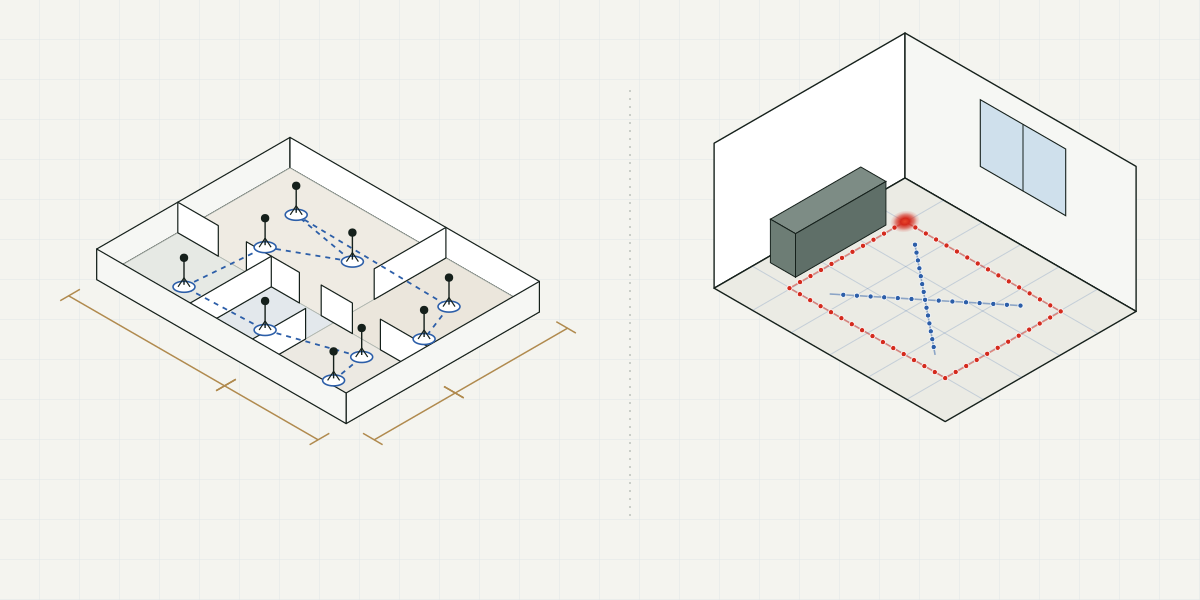
Matterport builds a 3D model of the whole property, with measurements, that clients explore by moving from one scan point to the next, and can also view from the outside like a dollhouse. Hausplat rebuilds each room from a phone video: clients move freely inside it, but each room is a separate tour.
They don't do the same thing. So the useful question isn't which one is better, but which one fits each property. What we say about Matterport comes from its help pages, checked in October 2026; plans and supported gear change, so check them before you decide.
How you capture
With Matterport
The Matterport app works with Matterport's own cameras (such as the Pro3), with some 360 cameras, and with a phone on its own, on iPhone and Android (the smartphone capture guide). In every case you scan point by point: you stand in one spot, that point is captured, and you move to the next until the property is covered. On phones with LiDAR, the app offers a LiDAR scan that, according to Matterport, improves the model's fidelity.
With Hausplat
You film each room as a video, with your phone: two slow loops, one near the walls and one through the middle, one to three minutes in total (the recording guide). There are no stops: the software locates the camera in every frame of the video and rebuilds the room with Gaussian splatting. You upload it from your dashboard and, with standard quality, the tour is ready in about an hour.
What clients explore
- With Matterport, the whole property in a single model. Inside, viewers move from one scan point to the next. They can also see the whole model from the outside, like a dollhouse, and switch to a floor plan seen from above (how navigation works).
- With Hausplat, one tour per room, each with its own link. Inside, viewers move freely: they step up to the window, look back from the door, glance down at the floor. Light and textures come from the video, so it feels a lot like being there. Whatever wasn't filmed stays empty or blurry.
Both open in the browser, with nothing to install. The difference between jumping from point to point and moving freely is covered in 3D tour vs. 360 tour.
Where Matterport is better
Plainly:
- The whole property in one walkthrough. If you want clients to go from the front door to the last bedroom in the same tour, Matterport does it and Hausplat doesn't: in Hausplat, each room is its own tour.
- Measurements and floor plans. Matterport has a measurement tool inside the model on every plan, labels room dimensions automatically, including ceiling height (automated measurements), and sells schematic floor plans as an add-on. Hausplat doesn't measure or make floor plans.
- The dollhouse view. Seeing the property from the outside helps people understand how the rooms connect.
- Listing sites know it. Some portals accept Matterport links directly in their virtual tour field: in Argentina, for example, Mercado Libre asks for a tour from YouTube or Matterport (its listing guide), and Zonaprop lists Matterport among its approved 360 tour providers (Zonaprop's list). Hausplat isn't on either.
- Technical work. For construction, architecture or insurance, Matterport sells technical files as add-ons designed for those uses.
Where Hausplat makes sense
- Moving freely. In a big living room, an open kitchen or a terrace, the feel of the space matters more than seeing the whole home.
- One video and you're done. No stopping to scan: two loops with the phone you already have.
- A clean tour. In the studio you delete floaters or anything you'd rather not show, and choose the view the tour opens with. Every edit is a new version.
- Social videos from the same tour. Also in the studio, you build camera paths and export vertical or horizontal videos in Full HD or 4K, without using credits.
- You pay per tour processed, not per tour online. More on that next.
How each one is billed
Matterport uses a monthly or annual subscription that renews automatically, and each plan lets you have a certain number of active spaces at once: the free plan allows one, and Professional plans from 10 to 150 (current plans). The Pro3 camera can't be used on the free plan, and add-ons such as schematic floor plans are purchased separately.
Hausplat uses credits. Your first tour is free, no card required; after that, plans start at USD 19 a month. One credit is one standard-quality tour (high quality uses 2 and maximum 5), and editing or exporting videos doesn't use credits. Published tours never expire. Do the math carefully: since each room is a tour, a property with three rooms filmed uses three credits.
A table to help you decide
| Matterport | Hausplat | |
|---|---|---|
| To capture | Matterport camera, 360 camera or phone | Your phone |
| How you capture | Scan point by point | One video of one to three minutes per room |
| What one tour covers | The whole property | One room |
| How people explore | Point to point, plus a dollhouse view | Walking freely |
| Measurements and floor plans | Yes (floor plans as an add-on) | No |
| How you pay | Subscription based on active spaces | Credits per tour processed |
Can you use both?
Yes, and sometimes that's the sensible choice. For a large home or a high-end property, a Matterport of the whole house with its measurements, plus a Hausplat tour of the rooms that sell it, with social videos. For most everyday listings, a tour of the main rooms made with a phone is usually enough.
How to try it
The simplest way to compare is with a room you know well. With Hausplat your first tour is free: you film following the recording guide, upload it, and about an hour later you have a link to walk through it. The plans are in the pricing section.